Skip To Content

Members: get the most from your plan

With Centivo you have access to local doctors and hospitals, virtual care options, emergency coverage anywhere and much more. See below for helpful tips and FAQs.

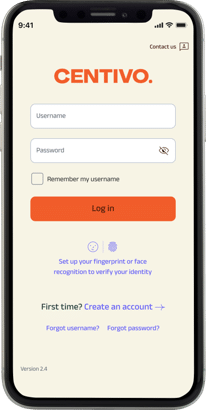
Already have your account?

Member login(this link opens in new window)

Start by creating your account

Search for doctors, see plan details, download your ID card and more, all in the palm of your hand.
• Search for doctors and facilities in your plan’s network
• Choose or change your primary care doctor (if applicable)
• Download a digital ID card
• See your coverage and costs
• Access pharmacy benefits
• View referrals (if applicable)
• See claims and spending
• Contact Centivo Member Care

Get started(this link opens in new window)

Answers to common questions

Are you a provider or employer? Use "Login" at the very top of this page.

Doctors, networks & referrals

  • Search for a doctor or provider from the Home page of the Centivo app or my.centivo.com, or by clicking Find Care. Search by provider type, location and other factors.

    Remember, if you go out of network your care may not be covered, or it might cost more.

    If you can’t find what you’re looking for, contact Centivo Member Care by calling the number on your Centivo ID card or sending a message through the app.

    For plans using a Cigna network: The app will take you to myCigna.com. The first time you visit myCigna.com, you’ll need to create an account using your Centivo member ID located on your Centivo ID card (this ensures the information you see is specific for your plan)

    For plans using the HPS Network: The HPS Network covers Eastern Wisconsin but if you live in or travel to an area where HPS providers aren’t available you have access to additional providers outside of the HPS service area.

    • Log in to the Centivo app or my.centivo.com
    • Go to Find Care
    • Use the link to “Search ZIP code”
    • If the ZIP code is in the HPS Network service area, click the “View Network” link in the HPS Network section.
    • If the ZIP is not in the HPS service area, click the second “View Network” link on the page.
    • Unsure which network to use? Contact Centivo Member Care for help.
  • Your Centivo ID card has the logo for your provider network on the front of the card. Your plan may use:

    • Centivo Network
    • A Cigna Network
    • HPS Network
    • PHCS Network
    • No network, with no logo on your card
  • Find behavioral and mental health providers using Find Care or the Health Hub in the Centivo app or my.centivo.com. You can choose an in-person or virtual provider.

    If you can’t find what you’re looking for, contact Centivo Member Care by calling the number on your Centivo ID card or sending a message through the app.

  • Most plans using the Centivo Network require you to activate, which means choosing a primary care doctor to lead your care. This keeps your costs lower and can keep you healthier, too.

    To activate, follow the prompts in the Centivo app or my.centivo.com. You can choose an local primary care doctor in your plan’s network or a virtual primary care doctor, like Centivo Care.

    If you don’t activate you may be assigned to a doctor, your care might not be covered, or you might pay more for your care. See your plan documents for details, or contact Centivo Member Care if you have questions.

    How to activate:

    • Log in to the Centivo app or my.centivo.com.
    • Pick a primary care doctor for everyone covered on your plan.
    • Choose an in-person or virtual primary care doctor. You can choose a pediatrician for children 18 and younger.
    • Once you activate, your doctor’s name will show on the screen when you log in.
    • Change your doctor at any time by logging into your account and clicking on your doctor’s name, or by contacting Centivo Member Care.
    • You can activate with a doctor and then see a nurse practitioner or physician assistant in their office.

    If you have trouble activating, want to activate with a doctor who is showing as “not accepting new patients” or have any other questions, please contact Centivo Member Care by calling the number on your Centivo ID card or sending a message through the app.

  • If your Centivo ID card says “referrals required” you need to get a referral to see a specialist. Go to your designated primary care doctor for your referral.

    Specialist visits that do NOT require a referral are:

    • Urgent or emergency care
    • OB/GYN
    • Behavioral health
    • Rehabilitation services such as physical therapy
    • Chiropractic care
    • Labs, X-rays and other covered tests – but your designated primary care doctor or a specialist for whom you had a referral must order these services, and pre-certification may be required.
  • Go to your designated primary care doctor and they will submit a referral to an in-network specialist for you. Referrals are automatically approved once they are submitted by your doctor.

    • Referrals must be from your designated primary care doctor, not a specialist, emergency room doctor or other provider
    • Make sure you see the referral in the Centivo app or my.centivo.com before making your appointment
    • Referrals usually show within 1-3 days, depending on the referring doctor
    • If you don’t see your referral, contact Centivo Member Care by calling the number on your Centivo ID card for help
    • Referrals are good for one year and the app shows how many days are left
    • If you need to see a different specialist, you’ll need a new referral

Emergency, out-of-area & care when traveling

  • Go to the nearest emergency room. Emergency care is covered at the in-network rate no matter where you are. You never need a referral for emergency care.

  • Urgent care is a good option for after-hours care, when you’re traveling, or when your regular provider isn’t available.

    • You can search for an in-network Urgent care facility in the Centivo app or my.centivo.com.
    • Your plan may offer telemedicine for virtual urgent care, 24/7. Log into the Centivo app or my.centivo.com and check the Health Hub to see if virtual urgent care is offered with your plan.
    • Emergency care is covered at in-network rates when outside the network area.
    • Your dependent may also have access to telemedicine for urgent care. If offered by your plan, you can find it in the Health Hub in the Centivo app or my.centivo.com.

    Depending on the network your plan uses, dependents living out of state may have other options for care.

    The Centivo Network:

    • Available in several cities across the U.S. The directory is searchable by location, so there may be providers near where your dependent lives.
    • They can choose Centivo Care as their primary care doctor if they are 18 or older and live in a state where it’s available. View the map here.
    • They can choose a primary care doctor close to their permanent address that offers virtual visits by phone, mobile device or computer.
    • They also have access to urgent care telemedicine, no matter where they are.

    Cigna, HPS, PHCS and other networks:

    • Typically available nationwide, log into the Centivo app or my.centivo.com then use the provider directory to search for a doctor nearby.
    • Emergency care is covered at the in-network rate no matter where you are. If you’re out of the country, you’ll need to pay for your care and submit a claim, so be sure to get a detailed receipt including what care you received and how much you paid.
    • Urgent care may be covered at the in-network rate when you’re away from home. See your plan details to confirm. (Log into the Centivo app or my.centivo.com and go to Coverage for plan details.)
    • Virtual urgent care is available 24/7 with many plans. Access virtual urgent care in the Health Hub section of the Centivo app or my.centivo.com.

Virtual doctors & services

  • Most plans include the convenience of virtual providers for primary care, urgent care, behavioral and mental health, physical and speech therapy and some other services.

    To find virtual providers,

    • Log in to the Centivo app or my.centivo.com
    • Go to Find Care and search by “Virtual providers”
    • Go to the Health Hub for additional information
  • Centivo Care is a virtual primary care practice offered with many plans. If your plan includes Centivo Care, you’ll find it in the Find Care section of the Centivo app or my.centivo.com.

    Centivo Care offers:

    • Annual wellness exams, sick care and help with ongoing conditions
    • Same and next-day appointments
    • A trusted care team that includes behavioral health
    • In-app chat and appointment scheduling
    • Prescriptions and refills
    • Referrals and coordination with in-person care

    To get started, choose Centivo Care when you activate, or go to centivocare.com for more info.

  • Go to Centivo Care to get started. You’ll need to download the Centivo Care app to get started, which is different from the Centivo app.

Costs & paying for care

  • Costs vary by plan. To see what your costs are:

    • Log in to the Centivo app or my.centivo.com
    • Click on Coverage
    • Then click on Overview of Coverage

    If you have questions about the cost of a visit or service, contact Centivo Member Care by calling the number on the back of your ID card or sending a message through the Centivo app or my.centivo.com.

  • To see your claims or explanation of benefits statements (EOBs):

    • Log in to the Centivo app or my.centivo.com
    • Click on Claims
    • Select Claim activity
    • Click on an individual claim to see details and a link to the Explanation of Benefits statement (EOB)

    HPS Network: Explanation of Benefits statements for plans using the HPS Network aren’t available in the Centivo app or at my.centivo.com. Please contact HPS/Paymedix at 888-477-7968 or create a Paymedix account.

  • To see how much you or your family have spent on qualified medical expenses:

    • Log in to the Centivo app or my.centivo.com
    • Click on Claims
    • Select Spending summary to see how much you’ve spent toward your deductible (if applicable) and out-of-pocket maximum.
  • With plans that use HPS, you don’t pay providers when you get care. Instead, HPS/PayMedix will pay your providers and send you a PayMedix SuperEOB statement.

    How it works:

    • You’ll receive a copy of your PayMedix SuperEOB in the mail
    • Your PayMedix SuperEOB will include all medical bills for everyone on your plan for an entire month (if you’d like to opt out of the shared version, contact HPS)
    • The SuperEOB will show the amount you owe, if anything, and you’ll pay HPS directly

    Please note, SuperEOB statements will not show in the Centivo app. To access a digital copy, register for an HPS Member Portal account at my.paymedix.com/login.

  • Plans using HPS include bundled pricing for some surgeries and procedures, which means lower costs for you. If your procedure is eligible for bundling, you’ll get one bill with everything on it, including the surgery center, anesthesiologist and other services related to your procedure.  Bundled savings are available for procedures such as:

    • ACL/MCL repair
    • Knee or shoulder replacement
    • Carpal tunnel release
    • Rotator cuff surgery
    • Colonoscopy
    • Endoscopy (upper, capsule, bariatric)
    • Sigmoidoscopy
    • And others

    To get these savings, you must contact the provider partner before you start your care to see if it qualifies. Log into the Centivo app or my.centivo.com, then go to the Health Hub for additional information.

ID cards, forms & other common questions

  • You can download a digital copy of your ID card in the Centivo app or my.centivo.com. To request a new physical ID card, send a message to Centivo Member Care using the Centivo app, or contact your employer.

  • Members can contact Centivo Member Care by:

    • Calling the number on the back of your ID card
    • Logging into the Centivo app and sending a message
    • Logging into my.centivo.com and sending a message

    Help is available in Spanish and 150+ other languages.

    Providers can contact Centivo by calling the number on the back of a member’s ID card. Providers can use Availity to verify eligibility, check claims and access Centivo’s referral portal through a single sign-on. Go to availity.com and select Centivo.

  • You can download the following forms here, or from the Coverage section of the Centivo app or my.centivo.com. Contact Centivo Member Care if you need a form you don’t see here.

  • Once you create your account, you’ll see the same information whether you log into the app on your phone or my.centivo.com on a laptop or other device.

    However, if you are a patient of Centivo Care virtual primary care practice, you’ll need to download the Centivo Care app to visit with your doctor.

  • As our network continues to grow, this isn’t uncommon.

    • Have them call the number on your ID card to verify if they’re in-network for your plan.
    • If your plan uses the Centivo Network, your doctor’s office can use the provider URL listed on the back of your card to see if they’re in-network and verify your eligibility.
    • If your plan uses a network other than the Centivo Network, there may be a network logo on your ID card to help your doctor’s office recognize they’re in-network for your plan.
    • You can always contact Centivo by calling the number on your ID card, and request that we contact your doctor’s office on your behalf.
  • If you’re starting a new Centivo plan and are pregnant (will be in your second or third trimester once the plan year begins) or actively being treated for a medical condition by a provider who isn’t in the Centivo Network, you may be eligible to continue care with your current provider at the in-network rate until your current treatment is completed. However, you must submit your request and determination must be made prior to receiving additional care. For more information or to submit this request, contact Centivo Member Care by calling the number on the back of your ID card.

  • Your pharmacy coverage is managed by a separate company, known as a Pharmacy Benefit Manager or PBM. Find your pharmacy details:

    • Log in to the Centivo app or my.centivo.com
    • Click on Coverage
    • Select Prescription Info
    • Click the Go to PBM site link for more information
  • Common terms used in health insurance:

    Premium: The amount you pay each month for your coverage, typically taken out of each paycheck. Premiums do not count toward your out-of-pocket maximum. Contact your employer with questions about your premium.

    Deductible: The amount you pay out-of-pocket before your health plan starts covering costs. Plans with no deductible start to pay for your care right away.

    Copay: A fixed dollar amount you pay for a healthcare service or visit.

    Coinsurance: The percentage of the cost you’ll pay for your care after you meet your deductible. In most cases, you either pay a copay or coinsurance, but not both.

    Out-of-pocket maximum: The most you’ll pay for any covered healthcare and pharmacy expenses during the plan year. Premiums do not count toward your out-of-pocket maximum.

    Referral: A formal recommendation from your primary care doctor to see another provider, like a specialist, for further evaluation or treatment.

    Order: Instruction for a procedure, diagnostic service, lab test or other planned service.

    Pre-certification: Approval from Centivo, your health plan administrator, for a specific service such as a surgery.

Didn't find what you were looking for?Get in touch

Contact Centivo Member Care by calling the number on your Centivo ID card or by sending a message through the app. Help is available in Spanish and 150+ other languages.

Providers and employers, use "Login" at top of screen.

Features and benefits described on this website may or may not be included in the plan(s) offered by your employer. If you’re already a Centivo member, log in to the Centivo app, my.centivo.com, or contact Centivo Member Care for additional details. Not a member yet? Ask your employer about your plan options.